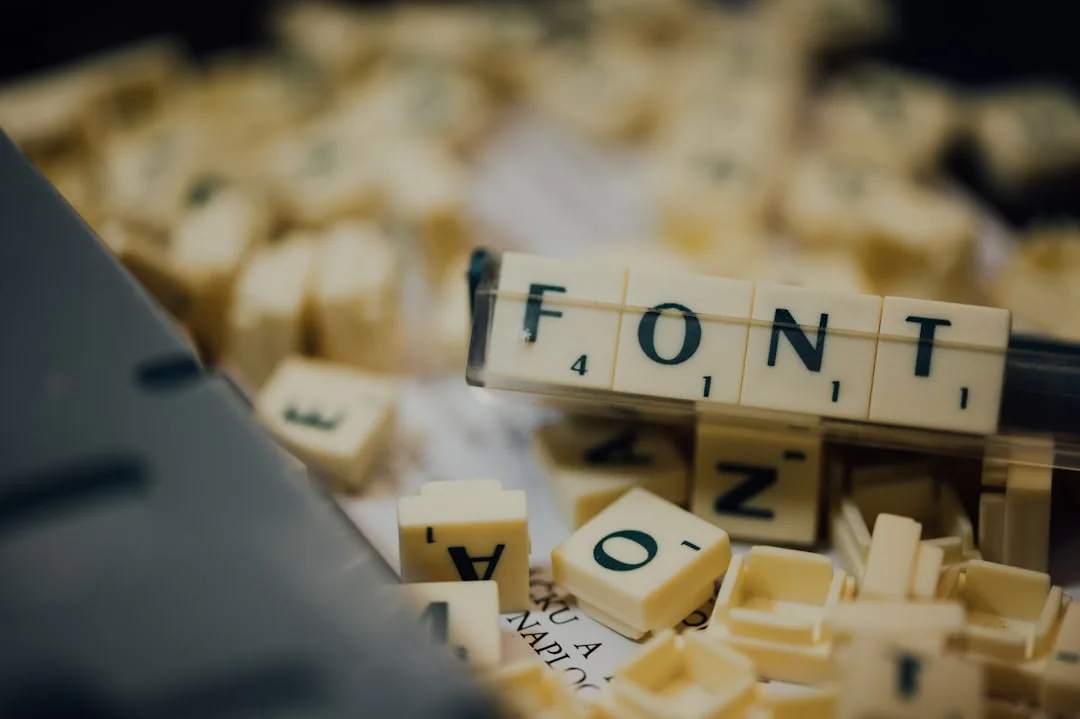
Type is the visible voice of a project. Format is the carrier that voice travels in. The wrong format makes a beautiful typeface render poorly, ship slowly, or violate a licence. The right format disappears: the type just works. The choice is rarely binary because each format was designed around a specific deployment target, and modern projects routinely span print, web, app, and embedded surfaces from a single identity system.
This guide covers the families of font formats that actually matter, the technical properties that distinguish them, and the licensing and craft considerations that should drive the choice for any project.
The Five Format Families
| Family | Examples | Primary Use | Notes |
|---|---|---|---|
| OpenType (TrueType flavour) | TTF | Desktop, print, web source | Quadratic curves, fast rasterising at small sizes |
| OpenType (CFF flavour) | OTF | Desktop, print, web source | Cubic curves, slightly smaller files |
| Web fonts | WOFF2 | Web delivery | Compressed OpenType, universal browser support |
| Variable fonts | TTF/OTF/WOFF2 with fvar | All surfaces | One file, every weight/width/style |
| Colour fonts | COLR, SVG-in-OT, SBIX, CBDT | Emoji, branded icon, decorative | Multiple parallel formats, fragmented support |
OpenType in 2026 is essentially the universal source format. TTF and OTF are containers around it. WOFF2 is OpenType wrapped in Brotli compression for the web. Variable fonts are OpenType with an interpolation axis table. Colour fonts are OpenType with extra glyph tables. Understanding OpenType means understanding 95 percent of font format decisions.
TTF Versus OTF
The distinction between TrueType and CFF flavours of OpenType comes from history. Apple developed TrueType in the late 1980s. Adobe developed PostScript Type 1, which became CFF (Compact Font Format) in OpenType. Microsoft and Adobe agreed on the unified OpenType wrapper in 1996. Either flavour can carry the same glyphs.
| Feature | TTF (TrueType) | OTF (CFF) |
|---|---|---|
| Outline curves | Quadratic Bezier | Cubic Bezier |
| File size | Slightly larger | Slightly smaller |
| Hinting | Detailed hinting language | PostScript hinting |
| Editor support | Universal | Universal |
| Conversion losses | Round-trip clean | Cubic to quadratic introduces minor approximation |
"The TTF versus OTF debate stopped mattering somewhere around 2010. What matters is whether the font is well drawn, well spaced, and well hinted. Container format is downstream of those questions." Steve Matteson, type designer at Monotype
WOFF2: The Only Web Format That Matters
WOFF2 (Web Open Font Format 2.0) became a W3C Recommendation in 2018. It applies Brotli compression to the OpenType data structure and consistently produces files 25 to 35 percent smaller than the older WOFF format. Browser support is universal across modern browsers since 2015.
The format does three things well. It compresses better than zip-based WOFF. It carries every OpenType feature including layout tables, variable axes, and colour glyphs. It is the only web font format that needs to ship for new projects in 2026.
@font-face {
  font-family: 'PublicSans';
  src: url('/fonts/PublicSans.woff2') format('woff2');
  font-weight: 100 900;
  font-style: normal;
  font-display: swap;
}
Older guides recommend supplying TTF and WOFF alongside WOFF2 for legacy support. That guidance is now harmful. The fallback files double or triple the asset budget while serving fewer than 0.1 percent of users. Skip them.
Variable Fonts and the Single-File Family
A variable font stores glyph outlines as a master plus delta tables along design axes. A single Inter Variable file at 320 KB raw or 90 KB subsetted replaces nine static weight files totalling 1.6 MB. The browser interpolates between the master and the delta to render any weight along the axis.
The five registered axes carry semantic meaning across foundries.
| Axis | Tag | Range | Meaning |
|---|---|---|---|
| Weight | wght | Typically 100-900 | Stroke thickness |
| Width | wdth | Percentage of normal | Horizontal compression |
| Italic | ital | 0 or 1 | Roman versus italic |
| Slant | slnt | Degrees, typically -15 to 0 | Angle of slant for oblique |
| Optical size | opsz | Typically 6-144 | Adjustments for display vs caption sizes |
"A variable font is one of the few cases in software where the right thing is also the simple thing and also the cheap thing. One file, every weight, smaller than a static three-weight family. There is no excuse to ship static files when a variable version exists." Erik van Blokland, type designer and TypeNetwork co-founder
For projects that mix print and web, the same variable OTF master can drive a print catalogue and a website. InDesign 2020 and later renders variable axes natively. The master file becomes the canonical source for the identity system.
Colour Fonts and the Format Fragmentation Problem
Colour fonts let glyphs carry their own colour palettes, gradients, and even raster images. Apple's emoji are SBIX (PNG bitmaps embedded in the font). Google's emoji are CBDT (similar bitmap approach). Microsoft and Adobe pushed COLR/CPAL (vector glyphs with palette indices). Mozilla pushed SVG-in-OT. Each format has its own browser and OS support matrix.
| Format | Origin | Supported By | Use |
|---|---|---|---|
| COLR v1 | Microsoft | Chrome, Edge, Firefox, Safari 16+ | Vector colour, gradients, modern emoji |
| SVG-in-OT | Mozilla, Adobe | Firefox, partial elsewhere | Complex artwork |
| SBIX | Apple | macOS, iOS, Safari | Bitmap emoji, raster decoration |
| CBDT/CBLC | Android, Chrome on Android | Bitmap emoji |
When colour fonts are appropriate, ship COLR v1 as the modern target. The format supports gradients and complex compositing while keeping file sizes manageable.
Print, Web, and App: The Three-Surface Choice
A complete identity system spans print, web, and app. Each surface has its own format expectations.
| Surface | Format | Notes |
|---|---|---|
| Print and editorial design | OTF (CFF) | InDesign, QuarkXPress, Affinity Publisher all accept OTF natively |
| Web | WOFF2 | Subset and self-host |
| Native iOS/macOS app | TTF or OTF | Embed in app bundle or load from Documents |
| Native Android app | TTF | Bundle as asset, load via Typeface.createFromAsset |
| Cross-platform app (Flutter, React Native) | TTF or OTF | Subset for the app's locale |
| Embedded UI (e-paper, microcontroller) | Bitmap or generated atlas | Convert from TTF using fontconvert or similar |
Licensing as a First-Class Concern
Font licences are misunderstood often enough that legal disputes about embedded fonts are a small but recurring industry. The major licence categories.
Desktop licence. Permits installing on a defined number of computers and using in print, design tools, and PDFs. Does not cover web embedding or app embedding.
Web licence. Permits self-hosting WOFF2 on a website with a usage cap (often pageviews per month). Does not cover apps.
App licence. Permits embedding in a mobile or desktop app binary. Often priced per app or per install.
Server licence. Permits using the font in server-side rendering pipelines (PDF generation, image rendering). Typically required for SaaS products.
Open licence (OFL, Apache, etc.). Permits any of the above without per-use fees, subject to attribution and distribution terms.
"Read the EULA. Foundries are not unreasonable, but the assumptions baked into desktop licences do not translate to apps or servers. Buying the right licence the first time costs a fraction of negotiating after a discovery letter arrives." Cyrus Highsmith, type designer at Occupant Fonts
Open-licence families have closed most of the quality gap with paid foundry releases for general-purpose work. Inter, Roboto Flex, Source Serif, IBM Plex, Atkinson Hyperlegible, and Public Sans cover most identity needs without a licence fee. Premium foundry licences earn their keep when a project needs character that no open-licence family provides.
Optical Sizing and Real Print Quality
Optical sizing is the practice of designing different glyph forms for different sizes. A 6 pt caption needs sturdier strokes, more open counters, and looser spacing than the same letterforms at 72 pt for a magazine cover. Print foundries shipped optical-size masters separately for decades. Variable fonts collapse the masters into a single file with an opsz axis.
Modern variable families with optical sizing: Source Serif 4, Recursive, Fraunces, Roboto Flex, Newsreader, Petrona. CSS exposes opsz through the font-optical-sizing property and the font-size shortcut, with browsers automatically setting opsz to match the rendered size.
body {
  font-family: 'Fraunces', serif;
  font-optical-sizing: auto;
  font-variation-settings: 'SOFT' 50, 'WONK' 0;
}
For editorial, magazine, and book design, optical sizing is the technical feature that visibly separates competent typography from amateur work. Format choice (variable OpenType with opsz axis) enables it.
The typography fundamentals at Evolang cover the editorial discipline that goes alongside optical sizing, and the e-book production pipeline at File Converter Free handles font subsetting for EPUB embedding when print fonts need to ship in digital editions.
Hinting, Anti-Aliasing, and the Rasteriser Question
The same TTF rendered on Windows, macOS, Linux, and a printer produces four visibly different results. Each platform's rasteriser interprets the font's hinting instructions differently.
Windows DirectWrite still respects TrueType hints aggressively. Older fonts hinted by hand for ClearType render extremely sharp at small sizes on Windows.
macOS CoreText largely ignores hinting and relies on heavy anti-aliasing. Type renders with softer edges but uniform appearance across sizes.
Linux FreeType is configurable. The default hinting on most distros approximates Windows behaviour. The autohinter, used when a font lacks manual hints, produces decent but not great results.
Print rasterisers ignore hinting because resolution is high enough to render outlines directly.
The practical implication is to test fonts on real devices, especially Windows at standard DPI, before committing. Faces designed for screens (Inter, Source Sans, Roboto) generally hold up across all four rasterisers. Faces designed for print first (Garamond, Bodoni, Didot) often look cramped or fuzzy at small sizes on screen.
"If you want type to look the way you designed it, render it on the device your readers will use, not the device you designed it on. The Windows rasteriser is the canary, not the macOS rasteriser." Tobias Frere-Jones, type designer
Format Choice for Specific Project Types
Marketing landing page. Variable WOFF2, single family, two or three weights. Self-hosted. font-display: swap. Metric-matched fallback. Total budget under 60 KB.
Editorial site or online magazine. Variable WOFF2, sans plus serif. Optical sizing where available. Per-script unicode-range subsetting. Total budget under 150 KB.
Web app. System fallback for body text (system-ui, sans-serif). One brand display font for headlines and chrome. Total font budget under 80 KB.
Print identity system. Master OTF with full character set. Optical-size masters. Stored in foundry-provided format. Generated WOFF2 derivatives for web.
Mobile app. App-licensed TTF subsetted to the locales the app supports. Bundle in app binary, load via system font API.
Each project type has a different right answer. The mistake is applying one project's pattern to another.
Future Directions
Three trends shape the next two to three years.
OpenType 2 development continues at the OpenType technical committee. New tables for hyphenation, mathematics, and improved colour handling are landing in OpenType 1.9 and beyond.
Variable colour fonts (variable axes plus COLR v1) are starting to ship from major foundries. Brand systems that need typographic flexibility plus multi-colour expression now have a single-format answer.
WOFF3 is being discussed but no specification has shipped. The improvement over WOFF2 would be modest because WOFF2's compression is already close to information-theoretic limits for OpenType data. Major browser vendors have not signalled urgency.
The author who treats format choice as a craft decision, not a default, ships type that works at every surface, every size, and every locale. The mechanics are visible and the licensing is knowable. The discipline is pattern matching: the right format for each surface, the right licence for each use, the right axis for each design.
Brand Identity Format Strategy
Brand identity systems span more surfaces than most projects realise. A typical brand uses type in print collateral, signage, websites, mobile apps, social-media graphics, motion graphics, presentations, internal documents, and contractor handoffs. Each surface has its own format expectations and licensing constraints.
The strategy that scales is to commit to a single foundry-licensed master OTF for the primary brand face, generate WOFF2 for web, document the app licence terms, and provide approved subsets to vendors who need the font for specific projects. This avoids the common failure mode where each vendor or contractor obtains their own copy through whatever channel and the brand ships with mixed versions of the typeface.
Brand systems that need to ship internationally face additional format decisions. A primary face that supports Latin, Cyrillic, Greek, and CJK in a unified family (Noto Sans, IBM Plex Sans, Source Sans Pro variants) reduces the number of distinct files and licences to manage. The trade-off is design specificity; foundry-exclusive faces rarely cover non-Latin scripts.
The compliance discipline at Corpy covers the contracting structure that protects brand-typography rights across multiple legal entities, and the QR and signage workflows at QR Bar Code cover the print-and-signage edge cases where format constraints often surface unexpectedly.
Font Format Migration Patterns
Brands sometimes need to migrate from one typeface to another, or from one foundry to another. The format-aware migration pattern reduces risk.
Step one: audit every surface using the current type. Web, print files, app binaries, internal templates, brand-asset libraries.
Step two: replicate the type weights and styles in the new format. Identify which static weights are needed and whether a variable replacement covers them.
Step three: generate format derivatives systematically. Master OTF, web WOFF2 with subsetting, app-bundled TTF, embedded fonts in PDF templates.
Step four: stage the rollout. Update web first because it is the easiest to revert. Update apps in the next release cycle. Update print templates as new collateral is produced.
Step five: document the cutover date and licence terms. Future contributors need to know which font to use without guessing.
This staged pattern prevents the common failure where a redesign rolls out across web on schedule but old PDFs and old app binaries continue to ship the previous typeface for months or years.
References
- World Wide Web Consortium. (2018). WOFF File Format 2.0. https://www.w3.org/TR/WOFF2/
- Microsoft Typography. (2024). OpenType Specification 1.9. https://learn.microsoft.com/en-us/typography/opentype/spec/
- World Wide Web Consortium. (2024). CSS Fonts Module Level 4. https://www.w3.org/TR/css-fonts-4/
- Spiekermann, E., Ginger, E. M. (2002). Stop Stealing Sheep and Find Out How Type Works (2nd ed.). Adobe Press. https://www.peachpit.com/
- Frere-Jones, T. (2018). Typeface Mechanics. Frere-Jones Type. https://frerejones.com/blog
- SIL International. (2007). SIL Open Font License 1.1. https://scripts.sil.org/OFL
- Apple Developer Documentation. (2024). Adding a Custom Font to Your App. https://developer.apple.com/documentation/uikit/text_display_and_fonts/adding_a_custom_font_to_your_app
- Variable Fonts Working Group. (2024). v-fonts.com gallery. https://v-fonts.com
Related Articles
Ready to Convert Your Files?
Use our free online file converter supporting 240+ formats. No signup required, fast processing, and secure handling of your files.
Convert Files